Master Your Annual Review with the Year Results Planner
As we approach the final quarter of the year, the instinct to reflect on our journey becomes almost overwhelming. Whether you are a seasoned entrepreneur reviewing quarterly KPIs, a creative professional assessing project portfolios, or simply someone trying to make sense of personal growth, the process of documentation is vital. However, the act of summarizing an entire year often gets bogged down by cluttered spreadsheets or uninspiring blank pages. This is where the Year Results Planner enters the conversation, offering a structured yet visually compelling environment for your annual review. It is not merely a document; it is a canvas for your data, designed to transform raw numbers and memories into a cohesive narrative.
The visual language of this planner speaks to modern sensibilities. It avoids the chaotic, overly decorative styles that often distract from the content itself. Instead, the Year Results Planner embraces a clean, minimalist aesthetic that prioritizes clarity. The layout is intuitive, guiding your eye naturally from one data point to the next. By utilizing the power of Canva, this planner transcends the limitations of static PDFs. You are not just filling in the blanks; you are engaging with a dynamic design asset that respects the principles of modern typography and visual hierarchy. It allows you to create a document that feels bespoke to your brand or personal style without requiring advanced design skills.
The Dual Aesthetic: Tailoring the Planner to Your Vision
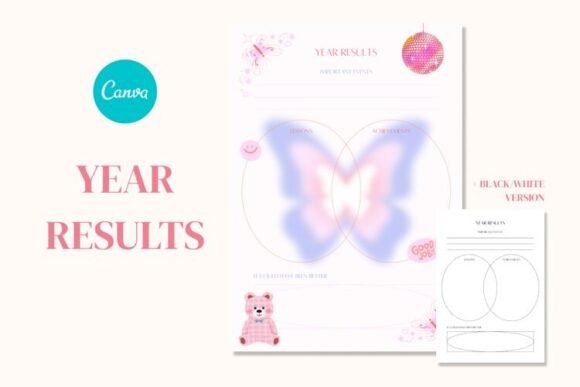
One of the most practical aspects of this template package is the inclusion of two distinct color schemes. This design decision acknowledges that data visualization is not a one-size-fits-all discipline. The color version of the Year Results Planner is vibrant and energetic, making it perfect for creative professionals, bloggers, and marketers who want their reports to pop. It utilizes color psychology to differentiate categories, helping to create immediate visual separation between different types of achievements or metrics. This version works exceptionally well for internal team presentations or personal journals where a bit of personality is welcomed.
Conversely, the black and white version serves a different but equally important purpose. In the world of corporate branding and formal reporting, grayscale is often the gold standard for elegance. This version ensures that your content takes center stage, free from the potential distraction of color. It is ideal for printing, as it conserves ink while maintaining high contrast and readability. For small business owners presenting a year-end summary to investors, or publishers creating a retrospective editorial piece, the monochrome option offers a timeless professionalism. The versatility of having both options allows you to adapt the same Year Results Planner to different audiences and contexts seamlessly.
Practicality Meets Digital Flexibility
The workflow for this tool is designed for efficiency. Upon purchase, you receive a zip archive containing a PDF with a direct link to the Canva template. This instant download system means you can begin your annual review immediately, without waiting for shipping or software installation. The instructions are straightforward: open the link on a computer, and the Year Results Planner loads directly into your Canva workspace. This approach leverages the accessibility of web-based design tools, making it a viable option for anyone with an internet connection.
Once inside Canva, the customization possibilities are vast. You are not locked into a rigid structure. You can adjust the typography to match your existing brand identity, swap out icons, or resize elements to fit specific print dimensions. This level of control is essential for brand identity consistency. If you are a content creator who uses specific hex codes or a particular serif font for your headers, you can integrate those elements directly into the planner. The ability to export the final product as both PNG and PDF files ensures that your year-end review is ready for any medium, whether it is a digital presentation, a social media post, or a printed portfolio piece.
Strategic Applications for Professionals and Creatives
For entrepreneurs and marketers, this planner is more than a record-keeping tool; it is a strategic asset. Documenting results is the first step in identifying trends, spotting opportunities, and planning for the upcoming year. The layout of the Year Results Planner encourages you to look at the big picture, analyzing performance across different quarters or project milestones. It acts as a physical manifestation of your business strategy, helping you to visualize growth trajectories and areas that require improvement.
Designers and hobbyists can also find immense value in this template. It serves as an excellent exercise in layout design and information architecture. By manipulating the template, you practice organizing complex information into digestible chunks—a critical skill in editorial design and packaging design. Furthermore, the clean aesthetic of the planner makes it a great source of inspiration for web design layouts or social media graphics. The structure can easily be adapted into an infographic summarizing a project's lifecycle, making it a versatile piece of your creative toolkit.
Maximizing Readability and Engagement
The effectiveness of any planner relies heavily on its readability. The Year Results Planner excels in this area by utilizing a balanced grid system. This ensures that text and data points are spaced correctly, preventing the "wall of text" effect that causes readers to disengage. When you customize the template, it is important to maintain this visual hierarchy. Use bold headings to denote major sections, such as "Q1 Highlights" or "Revenue Streams," and keep body text concise.
Consider the font pairing when you make your edits. If you decide to change the default typeface, ensure that your chosen sans serif font or display font complements the overall structure. A modern typography approach works best here—clean lines and ample white space allow your data to breathe. Remember that the goal is to create a document that you will actually want to look at. A well-designed year-end review can be a powerful motivator, turning the often tedious task of data entry into a satisfying creative process.
Getting Started and Support
The barrier to entry for this tool is low, but the potential output is high. By downloading the Year Results Planner, you are equipping yourself with a professional-grade design asset that simplifies the complex task of annual summarization. It is a solution built for the modern creator who values both aesthetics and functionality. Whether you are a small business owner closing the books or a content creator mapping out your creative evolution, this planner provides the structure you need to reflect effectively.
Should you encounter any issues with the download or the editing process, support is readily available. The creator, EveryDay!, is committed to ensuring a smooth user experience. This level of customer care adds an extra layer of reliability to the product. In a digital landscape often filled with disposable content, having a dedicated support line for a design template is a significant advantage. It allows you to focus on what matters most: capturing your results and planning for future success with a tool that looks as good as it performs.