Unleash Western Charm with the Cowboy Cowgirl Hat Canva Frame Template
There’s something undeniably magnetic about Western aesthetics. Whether it’s the rugged texture of worn leather, the distinct curve of a boot, or the iconic silhouette of a Stetson, these elements evoke a sense of adventure, tradition, and bold individuality. If you are looking to inject that specific brand of frontier spirit into your visual content without spending hours manipulating vector paths, the Cowboy Cowgirl Hat Canva Frame Template is a practical asset designed to bridge the gap between raw creativity and professional output.
Understanding the Visual Structure and Appeal
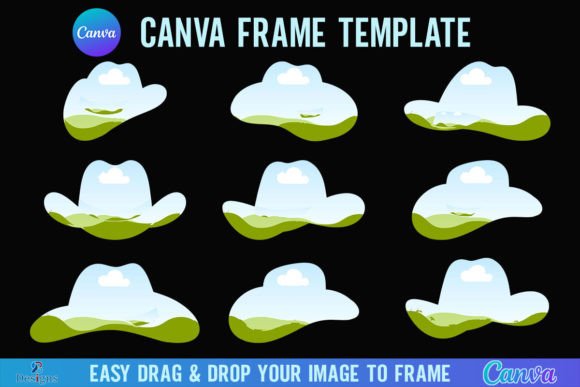
At its core, this digital product functions as a sophisticated clipping mask. You receive a convenient ZIP file containing a PDF with a direct link. Once you access the link, you are greeted with a collection of nine distinct Canva frame templates. The visual language here is specific: the frames mimic the contours of classic Western headwear. We aren't talking about generic shapes; these are carefully constructed silhouettes that capture the wide brims, tall crowns, and creased tops associated with cowboy and cowgirl hats.
The appeal of these frames lies in their ability to act as a creative container. In modern typography and layout design, we often use geometric shapes like circles or squares to organize imagery. However, using a thematic shape like a hat frame immediately signals a specific genre or mood. It tells the viewer, before they even read a single word of text, that the content is related to the West, rodeo culture, country music, or rustic elegance. It is a design asset that serves a dual purpose: it organizes content and establishes atmosphere simultaneously.
Seamless Integration with Canva
The technical specifications of this template are built for accessibility. With a canvas size of 4000x4000 pixels, these frames offer high-resolution fidelity suitable for both digital screens and physical prints. The workflow is designed for the drag-and-drop interface of Canva. You simply select a PNG or JPG background image and drop it into the frame. Canva handles the masking process automatically, ensuring your image fits perfectly within the hat silhouette. This ease of use makes it a valuable tool for busy entrepreneurs and content creators who need high-quality visuals without a steep learning curve in software like Adobe Illustrator.
Strategic Applications for Designers and Marketers
How you utilize the Cowboy Cowgirl Hat Canva Frame Template depends heavily on your project's goals. For logo design, these frames can serve as a temporary container or a permanent stylistic choice. Imagine a Western wear boutique needing a quick social media update; placing a product shot inside the hat frame creates an instant focal point that aligns with their brand identity.
In the realm of editorial design and blogging, these frames break the monotony of standard rectangular images. A lifestyle blogger writing about a trip to a dude ranch or a country wedding can use these frames to highlight key photos in their layout. It adds a layer of visual storytelling that standard cropping cannot achieve. This is particularly effective for social media graphics, where scroll-stopping power is paramount. An image masked into a unique shape creates a negative space pattern that draws the eye, increasing engagement rates.
Packaging and Merchandise
For those in packaging design, specifically within the food, beverage, or apparel industries, rustic branding is a massive trend. Think of craft breweries, barbecue sauces, or artisanal denim. Using this frame template allows you to mock up product labels or hang-tag designs that feel authentic to the genre. It helps in visualizing how a specific texture or pattern—like a denim weave or a sunset gradient—would look when constrained to a thematic shape.
Technical Considerations and Workflow Tips
While the Cowboy Cowgirl Hat Canva Frame Template is intuitive, understanding the technical limitations ensures a smooth creative process. First, you must have a free Canva account to open and edit the templates. This is a low barrier to entry, making it accessible to hobbyists and small business owners alike. However, there is a specific distinction regarding output formats.
If your goal is to create a sticker, a decal, or an overlay for video editing, you will likely need a transparent background. Standard Canva exports usually include a white or colored background. To download the frame filled with your image but without the background, you will need a Canva Pro version or higher. This is a crucial detail for designers planning to layer these frames over other complex backgrounds in different software.
It is also important to note what this product is not. This is a digital Canva frame template file only. It is not an SVG file, nor is it intended for use with Cricut Design Space or Silhouette cutting machines. If you are looking to create physical die-cuts for scrapbooking or physical crafts using a cutting plotter, this specific file format will not support that workflow. It is strictly for digital composition and print-on-demand graphic design.
Evaluating Fit and Visual Hierarchy
When incorporating distinct frames like these into your work, consider the principles of visual hierarchy. Because the hat shape is so recognizable, it naturally sits at the top of the visual hierarchy in a design. If you pair it with a very ornate script font or a complex handwritten font, the design might become cluttered. A better approach is often to pair the organic shape of the hat frame with a cleaner sans serif font for body text, or a bold serif font for headers. This contrast—organic shape versus structured type—creates a balanced composition that is easier for the audience to digest.
Consider the "personality" of your project. The Western aesthetic can range from gritty and vintage to polished and modern. A photo of a dusty trail used in the frame evokes the former, while a crisp vector illustration of a cowgirl hat used as a background image evokes the latter. The frame is merely the vessel; the content you drag into it defines the final tone. This versatility makes it a valuable creative font and asset companion, adaptable to various moods.
Practical Recommendations for Implementation
- Color Coordination: Ensure the colors inside the frame (your image) complement the surrounding text and background colors. Western palettes often rely on earth tones (ochre, sienna, slate blue) but don't be afraid to use high-contrast neon for a modern "Urban Cowboy" vibe.
- Resolution Check: Since the source file is 4000x4000 px, you have plenty of room to zoom and crop within the frame. Don't be afraid to zoom in on a specific detail of your background image to create an abstract look within the hat shape.
- Consistency: If using these frames for a series of social media posts, maintain consistency in where the "hat" sits on the canvas. Aligning the frames to a grid ensures your feed looks curated and professional.
Ultimately, the Cowboy Cowgirl Hat Canva Frame Template is about adding personality to your pixels. It allows you to step outside the standard grid and embrace a shape that resonates with a specific cultural aesthetic. Whether you are a marketer crafting a campaign for a rodeo event, a small business owner designing merchandise, or a hobbyist making party invitations, this tool provides a straightforward path to polished, thematic design. It reminds us that sometimes, the best way to frame a picture is with a silhouette that tells a story of its own. By leveraging these design assets, you save time, maintain high-resolution quality, and ensure your visual branding hits the mark every time.